

Daylight View Basic Optimizes Image Quality in Bright Rooms
Daylight View Basic enhances image sharpness by clarifying detail definition in dark areas of the picture, which can be difficult to see in bright light. A sensor measures the amount of ambient light in the room and optimizes halftone color and brightness for best results according to surrounding levels of illumination.
![Daylight View Basic [OFF] / Daylight View Basic [ON]](https://docs.connect.panasonic.com/projector/products/vmz71/img/features/feature002.jpg)
New Digital Zoom Extender Function
One consideration when updating your school or business projectors is: will the replacement projectors fit the existing mount positions on the ceiling? In some cases, the throw-distance required to produce an image at the desired size might exceed the projector’s optical zoom range. Panasonic answers the problem with a new Digital Zoom Extender function equipped for the first time on the PT-VMZ71 Series. It provides a convenient way to fit the image to your screen beyond optical zoom range, reducing need to relocate your projector mounts and potentially saving you time, money, and hassle on your next refreshment cycle.
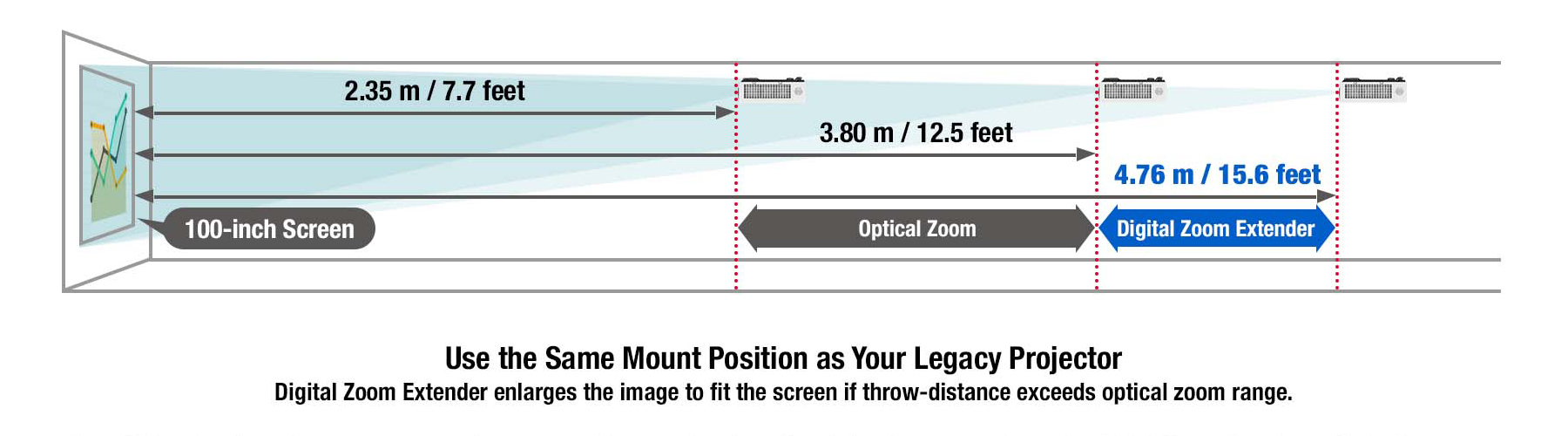
Note: Installation range may vary for the PT-VMZ51, PT-VMZ51S, PT-VMZ41, and PT-VMW51. The PT-VMZ5ES is equipped with a 1.2x optical zoom lens, with projection distances ranging from 2.92–3.53 m (9.6–11.6 ft) using optical zoom, and up to 4.42 m (14.5 ft) with the Digital Zoom Extender. Resolution decreases when using Digital Zoom Extender. 6-Point Screen Correction, V/H Keystone Correction, and curved-screen correction are not available when using this function, and range of corner adjustment is limited.
Multi Monitoring & Control Software
Panasonic’s free AV management software for Windows® PC lets you monitor and control up to 2,048 compatible display devices of any brand via LAN to reduce maintenance hassle within display networks of any scale. Multi Monitoring & Control Software enables status monitoring, device control, content playlist delivery, playback scheduling, and system-map visualization. For more information, visit our software information webpage.
Plug-and-Play Display with Memory Viewer
You don't even need a computer to start presenting—just insert a USB memory device containing compatible still images to the projector’s USB port, press the NETWORK/USB button on the remote, select MEMORY VIEWER, and start presenting. Advance or go back to the previous slide using the arrow keys on the remote.
Key Features
- Laser LCD, 5200 lumens, WUXGA
- Long lasting laser light source provides consistent brightness and 20,000 hours maintenance-free operation
- A 1.09:1 throw-ratio and a wide horizontal and vertical lens-shift allow to create large images even in small spaces
- Support 4K and 30p signal input, making the range a futureproofed solution to projecting the latest image quality and content
- Optional Wireless projection capability
| Brand | Panasonic |
| Lumens (ANSI): | 5,200 Im |
| Time until light output declines to 50 %3 | 20,000 hours (NORMAL/QUIET)/24,000 hours (ECO) |
| Resolution | WUXGA (1920 x 1200 pixels) |
| Contrast Ratio: | 3,000,000:1 |
| Screen size (diagonal) | 0.76–7.62 m (30–300 in), 16:10 aspect ratio |
| Center-to-corner zone ratio: | 85% |
| Lens | 1.2x Manual zoom (Optical) (Throw ratio 1.36-1.64:1) Manual focus lens, F=1.61 -1.76, f=19.10-23.00 mm |
| Digital Zoom Extender 4 | Throw Ratio 1.36:1-2.05:15 Throw ratio 1.09–2.21:15 (Corresponding value) (When optical zoom is used together.) |
| Maximum power consumption | 275 W (2.9A-1.2A) [285VA](The power consumption is265 W at 200-240V) |
| Dimensions (W x H x D) | 399 mm x 115 mm x 348 mm (not including protruding parts) 399 mm x 133 mm x 348 mm (with feet at shortest position) |
| Weight | 6.5 Kg |